
How to install Forge for Minecraft
Forge is the oldest and most popular mod loader: big tech and magic modpacks run on it, and it works with OptiFine. Here are two ways to install it: in a minute with Why Launcher, or manually with the official installer.
With Why Launcher — in a minute
- Download and install Why Launcher. It’s free and needs no admin rights.
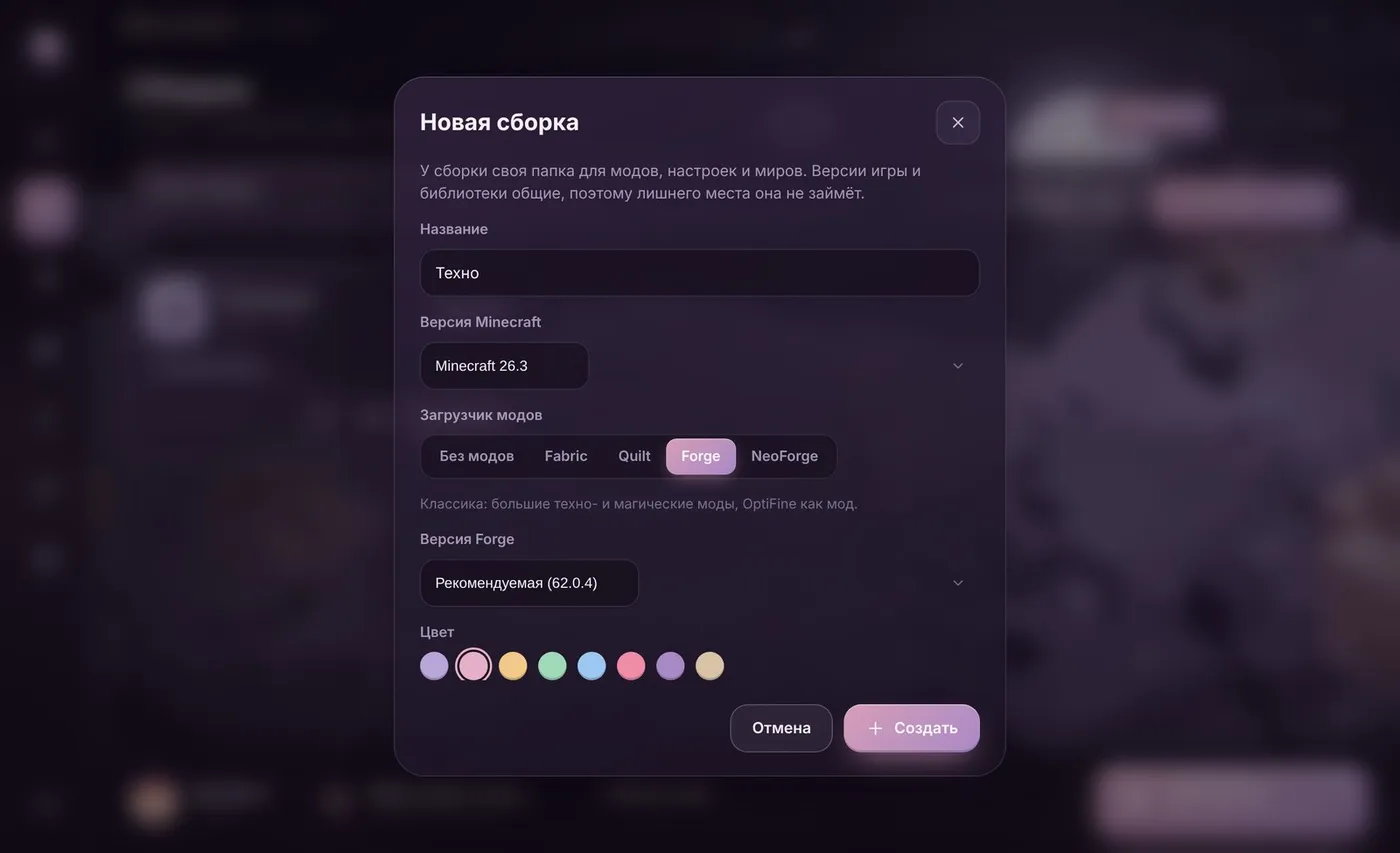
- Open Сборки (Profiles) and press Создать сборку (Create profile).
- Pick a Minecraft version, the Forge loader, and keep the Forge version on “Рекомендуемая” (Recommended). Press Создать (Create).
- Press Играть (Play). The launcher downloads Forge, the right Java and libraries, and starts the game.
Already have a profile without mods? Open Моды, паки и скины (Mods, packs and skins): loader buttons sit at the top, and Forge installs it into the current profile. The Why Launcher interface is in Russian, so button names are given in Russian with a translation.
0 downloads from this site
Manually with the official installer
- Install the official Minecraft Launcher and run the version you need at least once without mods. This creates the
.minecraftfolder the Forge installer needs. - Open files.minecraftforge.net, pick the Minecraft version on the left and press Installer in the Recommended box.
- An ad page opens. Wait a few seconds and press Skip in the top-right corner:
forge-…-installer.jarstarts downloading. Don’t click anything else on that page. - Run the downloaded file. If the file opens as an archive or doesn’t start at all, the computer has no Java: install it from adoptium.net (Temurin, LTS version) and run the file again.
- Choose Install client and press OK. A success message appears in about a minute.
- Open the official launcher, pick the forge installation and press Play. Mods go into
%APPDATA%\.minecraft\mods.
If something goes wrong
- The mod version must match both the Minecraft version and the loader: a mod for Forge 1.20.1 won’t run on 1.21 or on Fabric.
- The game crashes on start — remove recently added mods one by one to find the culprit. In Why Launcher you can switch mods off without deleting them.
- Lag or OutOfMemoryError — big modpacks need 4–8 GB of memory. See “How much RAM for Minecraft”.
- Forge or NeoForge? From 1.20.2 many mods moved to NeoForge. Check which loader the mod page lists.
FAQ
What’s the difference between Forge and Fabric?
Forge suits large mods that change the game a lot and big modpacks. Fabric is lightweight and gets new Minecraft versions faster. Mods for one loader don’t run on the other — check what the mod is made for.
Can I use Forge and OptiFine together?
Yes, if OptiFine is released for your Forge version: the OptiFine file goes into the mods folder like any mod. In Why Launcher just press OptiFine in a Forge profile — it installs as a mod by itself.
Where is it safe to download Forge?
Only from files.minecraftforge.net. Re-upload sites sometimes ship fake installers. Why Launcher downloads Forge straight from Forge’s official server.