
How to make your own Minecraft resource pack
A resource pack is just an archive of pictures that replace the game’s textures. You can make your own in five minutes: recolour grass, diamonds or planks and play with them right away.
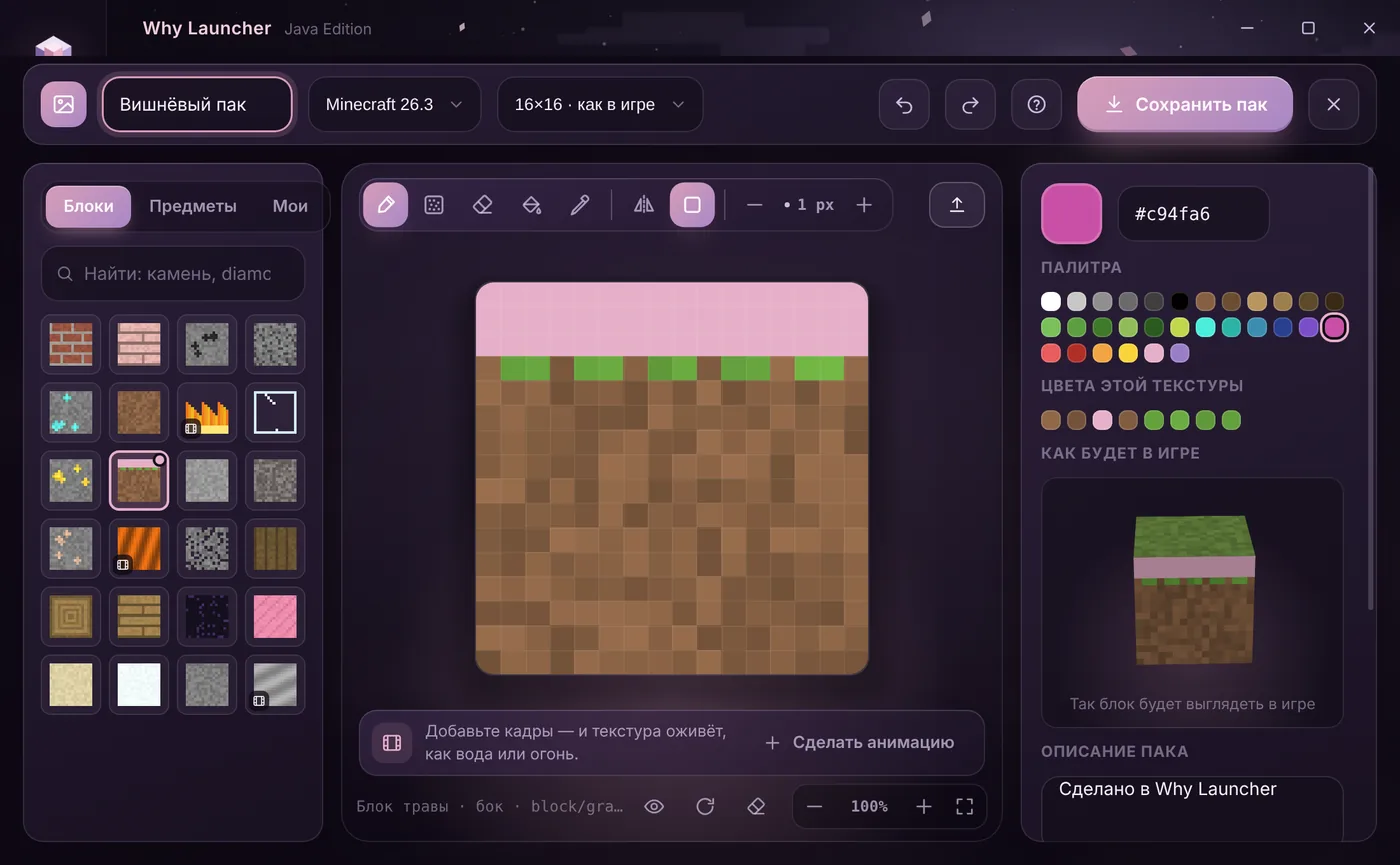
In the Why Launcher editor
- Download and install Why Launcher and download the Minecraft version you need at least once — the textures come from the game files.
- Open Моды, паки и скины (Mods, packs and skins) → Ресурспаки (Resource packs) and press Создать ресурспак (Create resource pack).
- Pick a block or item on the left and paint with the brush, textured brush, fill and eyedropper, or press Вставить картинку (Paste picture) to use your own PNG. The resolution is at the top: 16×16 like the game or HD up to 1024×1024.
- Press Сохранить пак (Save pack): it goes into the resourcepacks folder of the selected profile and is switched on in game right away.
Water, lava and fire are edited frame by frame: a frame strip appears below and ▶ plays the animation. You can add frames to any block to bring it to life. A pack made in the launcher opens again from “Мои паки” (My packs). The Why Launcher interface is in Russian, so button names are given in Russian with a translation.
0 downloads from this site
By hand
- Find the original textures: open
%APPDATA%\.minecraft\versions\<version>\<version>.jarwith an archiver (7-Zip or WinRAR) and copy the pictures you need fromassets/minecraft/textures/blockoritem. - Create the pack folder with the same nested folders inside:
assets/minecraft/textures/block. Put your repainted pictures there with the same file names. - Paint in any editor that saves PNG without smoothing: Paint.NET, Aseprite, LibreSprite. Don’t change the size — 16×16 must stay 16×16.
- Next to the
assetsfolder create apack.mcmetafile with a description and the pack format number:{"pack": {"pack_format": 34, "description": "My pack"}}. Each game version has its own number — see the “Pack format” page on minecraft.wiki. - Select
pack.mcmetaand theassetsfolder and zip them — those two, not the folder around them. Put the archive into.minecraft\resourcepacksand turn it on in game.
If something goes wrong
- The pack doesn’t show up —
pack.mcmetamust sit right inside the zip, without an extra folder on top. - Grass and leaves look grey — that’s by design: the game tints them per biome. In Why Launcher the 3D block shows them with the plains colour.
- Water, lava and fire are animated textures: the frames sit in one picture top to bottom, with a .png.mcmeta file for the speed. Why Launcher does this for you; by hand keep all frames and the .mcmeta.
- HD textures (64×64 and up) work in vanilla. But 512×512 and 1024×1024 load the graphics card heavily — 32–128 is usually enough for blocks.
- The pack icon is a 64×64
pack.pngnext topack.mcmeta. Why Launcher makes it from your textures.
FAQ
Can I publish my resource pack?
Yes, on Modrinth or CurseForge. Say in the description that the pack is based on Minecraft’s textures — every pack author does.
Does the pack work on other versions?
Usually yes: the game warns that the pack was made for another version, but you can turn it on. If a texture was renamed in a newer version, it just won’t be replaced.
Why does the description say “Сделано в Why Launcher”?
That’s how the pack tells where it was made — the launcher is free, and this helps it grow. You can change the description before saving.